

Prerequisites
- By default, this Databricks integration makes use of Unity Catalog data governance features. You will need Unity Catalog enabled on your Databricks Workspace.
1
Create a SQL warehouse
Create a new SQL warehouse for data writing.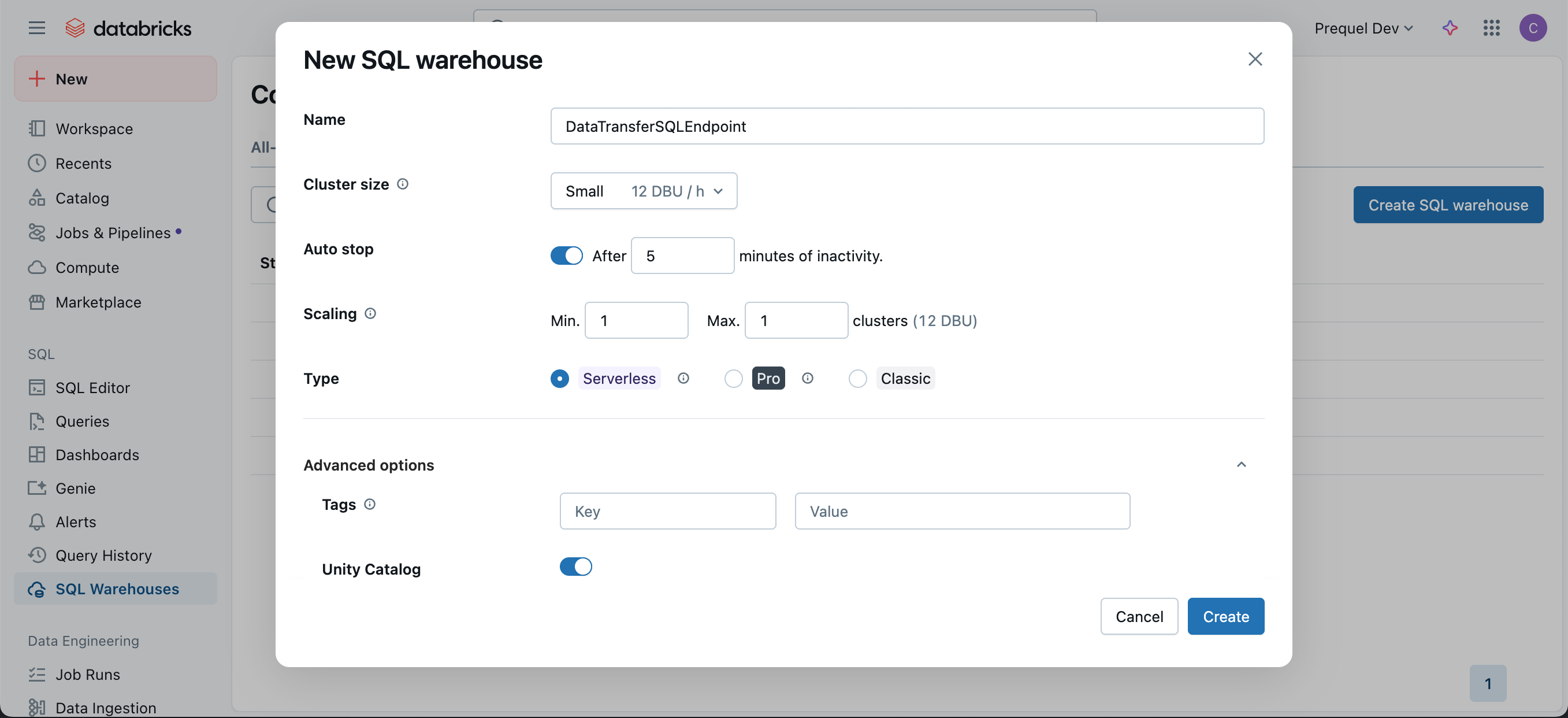
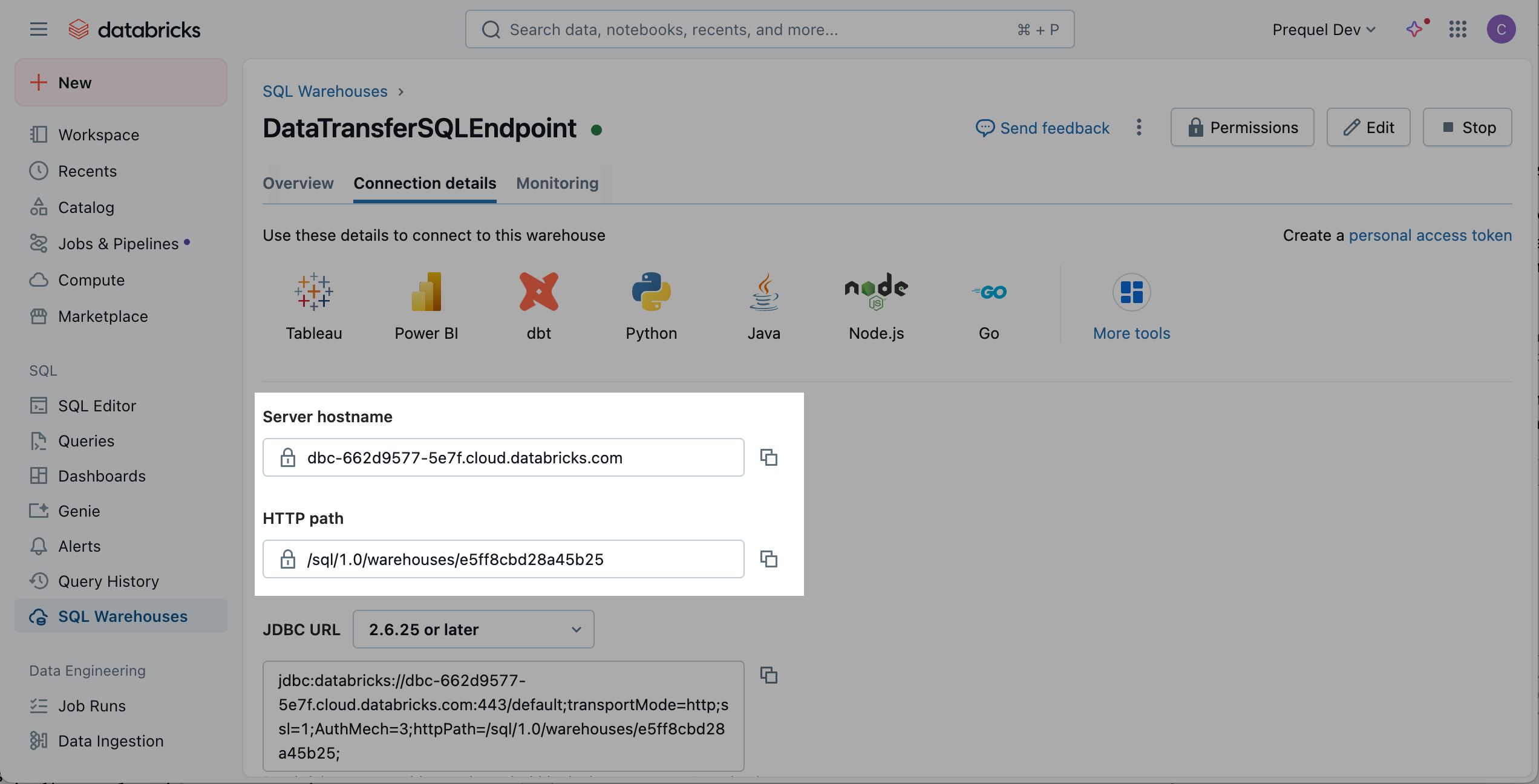
- Log in to the Databricks account.
- In the navigation pane, click SQL Warehouses.
- In the SQL Warehouses console, click Create SQL Warehouse.
- In the New SQL Warehouse menu, choose a Name and configure the options for the new SQL warehouse. Under “Advanced options” ensure “Unity Catalog” is in the On position and click Create.
- Once the SQL warehouse is created, click the Connection Details tab, and make a note of the Server hostname, Port, and HTTP path.
2
Configure Access
- OAuth Secret (recommended)
- Personal Access Token (PAT)
- In your Databricks workspace, click your username or icon in the top right, click Settings, Identity and access, and next to the Service Principals options, click Manage.
- Click the Add service principal button, click Add new in the modal, enter a display name and click Add.
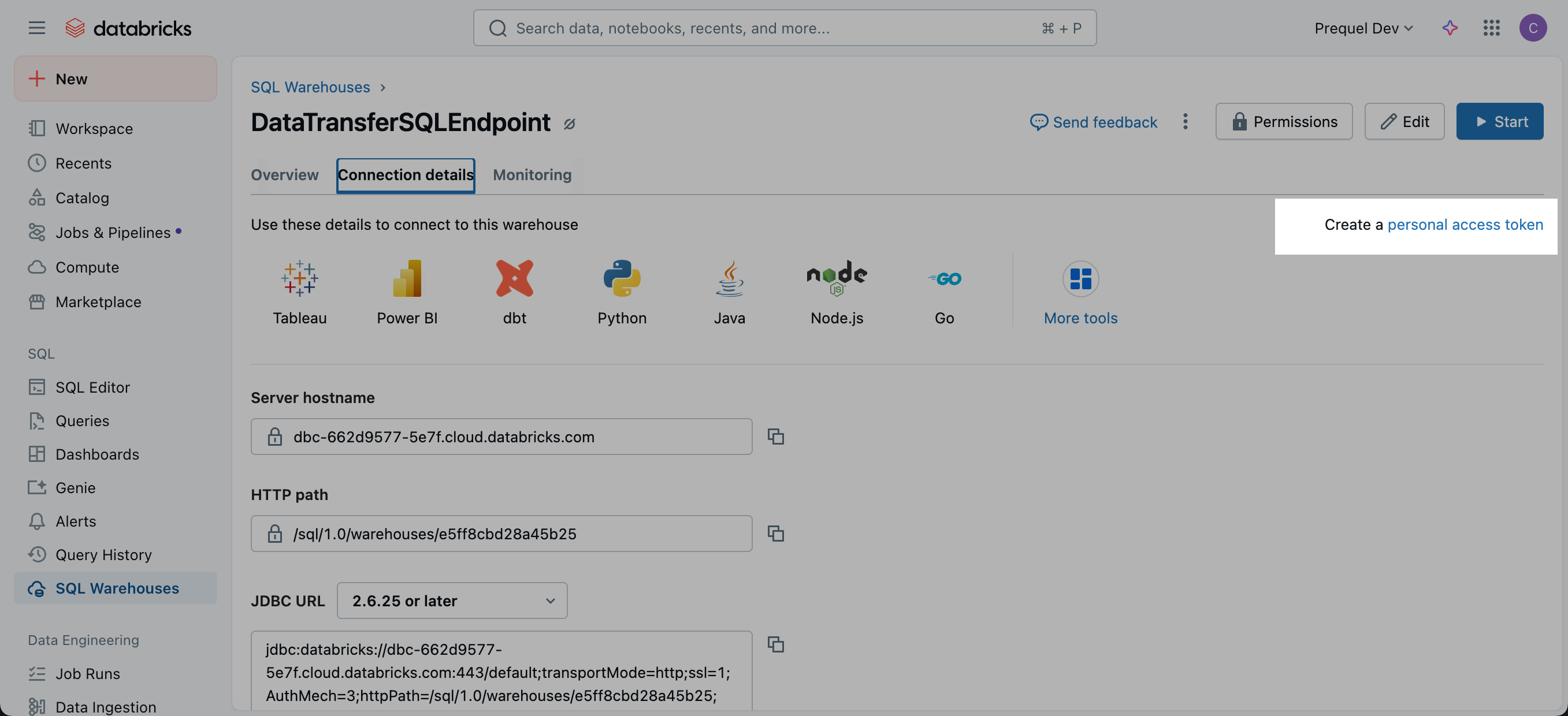
- Click on the newly created Service Principal, and under the Secrets tab, click Generate secret.
- Enter a lifetime for the secret (e.g., 90 days, 180 days, or 365 days), click Generate and make a note of the Secret value and Client ID. The Client ID is the Application ID of the Service Principal, not the ID of the secret.
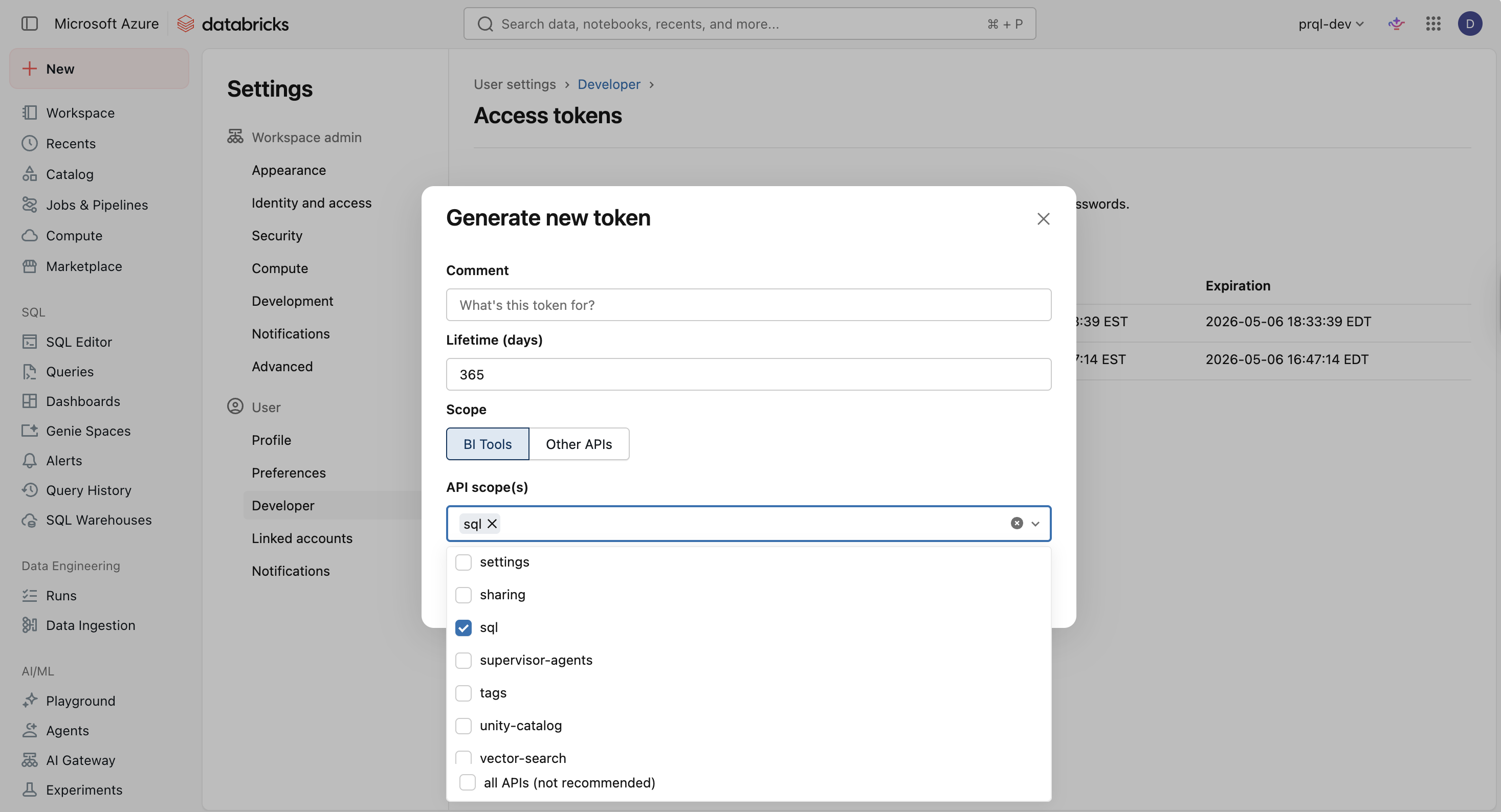
Select the
all APIs scope when generating the secretThe OAuth connection method currently requires the all-apis scope. If the Databricks UI prompts you to choose scoped OAuth secrets for the secret, select all APIs. Secrets limited to narrower scopes such as sql will fail to connect.This scope only controls which Databricks APIs the secret can call. What the service principal can read and write is still governed by the warehouse permission and Unity Catalog grants you configure in the following steps.- Navigate back to the SQL Warehouses section of your Workspace, click the SQL Warehouses tab, and select the SQL Warehouse you created in Step 1. Click Permissions in the top right, search for and select the Service Principal you created, select the Can use permission, and click Add.
- In the Databricks UI, select the Catalog tab, and select the target Catalog. Within the catalog Permissions tab, click Grant. In the following modal, select the Service principal for which you generated the OAuth token, select
USE CATALOG, and click Grant. - Under the target Catalog, select the target schema (e.g.,
main.default, or create a new target schema). Within the schema Permissions tab, click Grant. In the following modal, select the principal for which you generated the access token, and select eitherALL PRIVILEGESor the following 9 privileges and then click Grant:USE SCHEMAAPPLY TAGMODIFYREAD VOLUMESELECTWRITE VOLUMECREATE MATERIALIZED VIEWCREATE TABLECREATE VOLUME
System catalog accessIn addition to the target catalog, the principal requires
USE CATALOG on the Databricks system catalog. Databricks provides this access by default, so most organizations do not need to take any action. If your organization has restricted access to the system catalog, grant USE CATALOG on it to the principal.The system catalog is privilege aware. The principal can only see metadata for the objects it has already been granted access to. See Databricks documentation: Information schema.IP Access Lists (optional)If your workspace enforces Databricks IP Access Lists, allowlist the static egress IP(s) used by the data transfer service so connections and test sessions can open successfully. See Databricks documentation: Databricks IP Access Lists.Cloud Hosted (US):
35.192.85.117/32Cloud Hosted (EU): 104.199.49.149/32If private-cloud or self-hosted, contact support for the static egress IP.3
Add your destination
Use the following details to complete the connection setup: server hostname, HTTP path, catalog, your chosen schema name, and authentication details.
Terraform
If your organization manages infrastructure with Terraform, you can use the configuration below instead of the steps above. It sets up the same resources and permissions, using OAuth secret authentication.- Use the official
databricks/databricksprovider. Run it as a workspace admin who can grant privileges oncatalog. - In
terraform.tfvars, setcatalog(an existing catalog),schema_name, andwarehouse_size. The optional inputs and their defaults arecreate_schema(true),warehouse_name(transfer-warehouse),serverless(true),service_principal_name(transfer-service-principal), andforce_destroy_schema(false). - After
terraform apply, use theserver_hostname,port,http_path,catalog,schema,client_id, andclient_secretoutputs to complete the connection setup. Print each withterraform output -raw <name>. - The client secret expires after 730 days. The next
terraform applyafter that creates a new secret, which you then update in the connection.
Permissions checklist
- Workspace: Service principal or user has permission to use the target SQL warehouse (“Can use”).
- Unity Catalog:
USE CATALOGon the target catalog and on thesystemcatalog (provided by default); appropriate privileges on the target schema (e.g.,USE SCHEMA,CREATE TABLE, and read/write volume privileges as needed), orALL PRIVILEGESon the schema. - If using Hive Metastore (instead of UC): select
hivemetastore explicitly and configure required object storage staging (bucket and credentials), with write/delete permissions. - Network: If IP Access Lists are enabled, the static egress IP(s) are allowlisted.
Optional: Add a short retention lifecycle policy (Hive Metastore only)If using an S3 staging bucket with Hive Metastore, you may configure a lifecycle rule on the bucket to automatically delete objects older than 2 days as the bucket is not used to persist data. In the bucket Management tab, click Create lifecycle rule, set an expiration action for current versions of objects with a 2-day age. Note that transfer logic automatically cleans up files after transfer completion, so this is an optional step.
FAQ
What supported authentication method is recommended to securely connect to Databricks?
What supported authentication method is recommended to securely connect to Databricks?
Recommended: OAuth with a service principal. OAuth issues short-lived tokens, scopes access via the principal’s entitlements and UC grants, and supports centralized rotation and revocation. Personal Access Tokens (PATs) are supported where policy requires, but they are long-lived bearer tokens and typically inherit broader, user-level permissions.
What permissions are required?
What permissions are required?
The connection identity needs
Can use on the SQL warehouse, USE CATALOG on the target catalog, and schema-level privileges to create/manage tables (or ALL PRIVILEGES on the schema). Missing USE CATALOG is a frequent cause of test-connection failures.What credentials and connection details are required?
What credentials and connection details are required?
Provide Server hostname, HTTP path, Catalog, Schema, and an OAuth client (service principal) or PAT with warehouse access. Collect host/path from the SQL Warehouses console.
Do you support Unity Catalog and Hive Metastore?
Do you support Unity Catalog and Hive Metastore?
Yes. Unity Catalog is the default. For Hive Metastore, explicitly select
hive in configuration and supply an S3 staging bucket and credentials. Using the wrong metastore type can cause discovery or permission issues.