

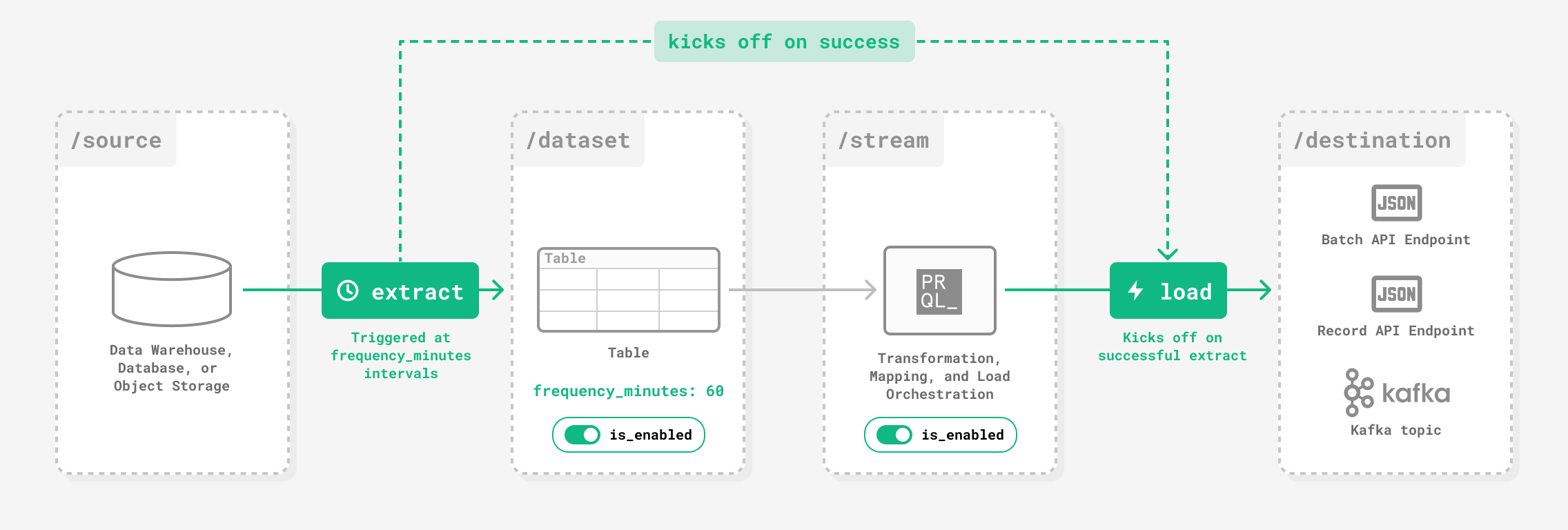
Scheduled extracts
Set how often a Dataset is extracted withfrequency_minutes on the Create dataset or Update dataset request. Allowed values are 15, 60, 360, 720, and 1440 minutes; frequency availability depends on your plan. Schedules run at fixed UTC times shared across your account and daily Datasets are extracted at midnight UTC by default. Contact your Prequel representative to enable faster frequencies or change the time of day.
Loads after an extract
When an extract succeeds, Prequel Import creates one load for each enabled Stream that reads from the Dataset and has records to deliver. If a Stream’s circuit breaker is tripped, its load is recorded as skipped instead of delivered. A failed extract creates no loads. Each load delivers the Stream’s records that have not been delivered yet, plus any record whose content changed since its last delivery. For retries, redelivery, and circuit breaking on failed deliveries, see Delivery failure handling.Controlling orchestration
You can control orchestration of extracts and loads using theis_enabled flag on each resource:
- Dataset: Disabling a Dataset stops its scheduled extracts and the loads they start. Use Update dataset.
- Stream: Disabling a Stream stops automatic loads to it while extracts continue for the Dataset. Use Update stream.
Triggering through the API
In addition to or instead of Prequel’s orchestrator, you can run extracts and loads using Prequel’s API. See Initialize extract and Initialize load. An extract with afilter does not start loads, because Prequel does not assume what a resync should deliver. Initialize a load afterward to deliver its changes.