> ## Documentation Index
> Fetch the complete documentation index at: https://docs.prequel.co/llms.txt
> Use this file to discover all available pages before exploring further.
# Advanced table mapping
> Configure custom mappings between Source Datasets and target Destination schemas
Prequel Import anticipates the case where Source Dataset schemas do not perfectly match target Destination schemas without some mapping and transformation. To support bridging between the two, Prequel supports a number of mapping and transformation options.
## Who's responsible for performing the mapping?
Prequel Import provides tooling to support both the Destination owner (you) to perform the mapping, as well as to expose this experience to your users. If you plan to embed this experience for your customers, please see the [Customer Experience](/import/getting-started/customer-experience) guide.
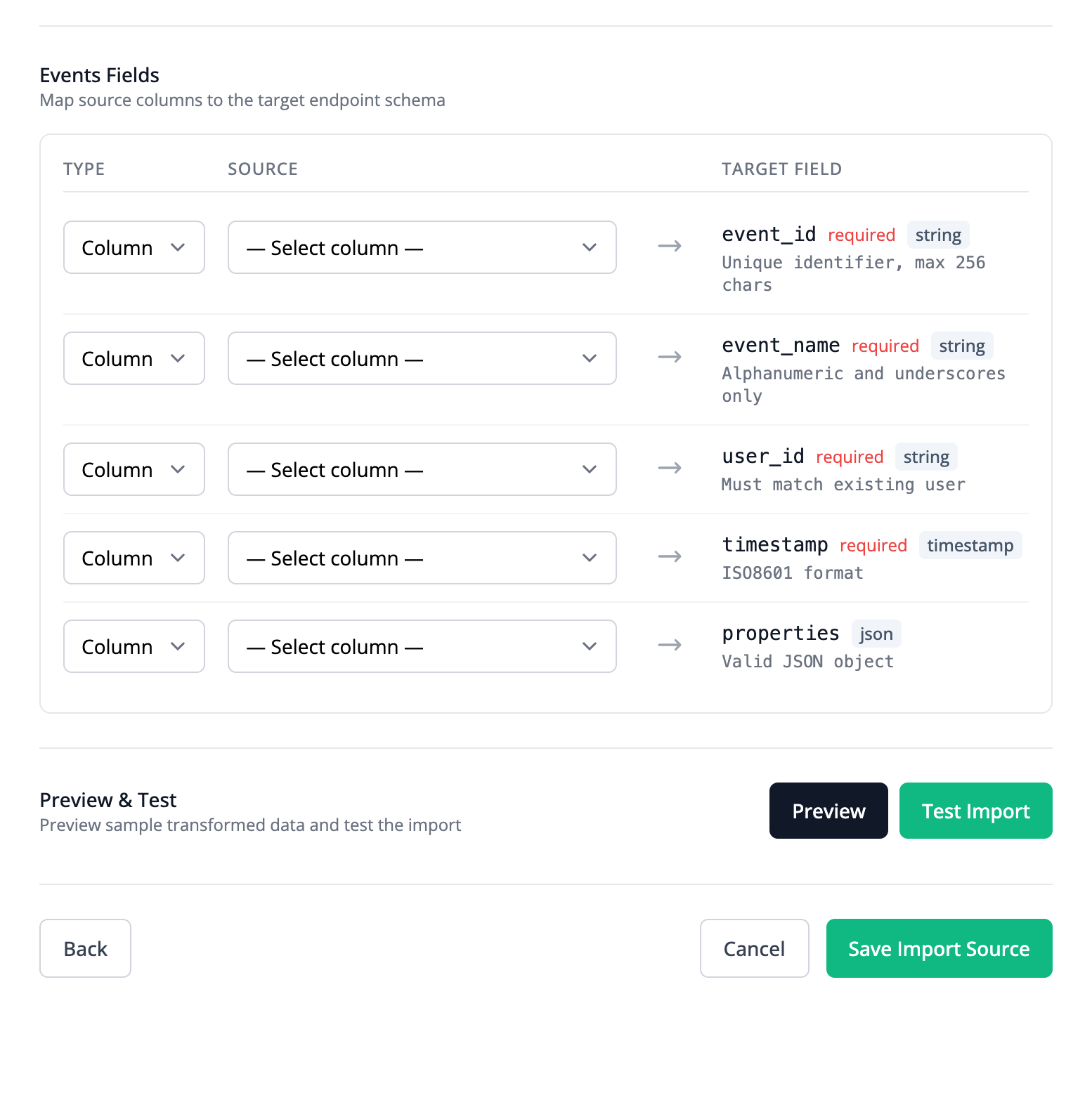 ## Custom queries
At a full table level, custom SQL queries can be used to transform the Source data. This is a good solution for users that are comfortable with SQL, or who need aggregations or logic that spans multiple rows.
## Mapping categories
Each Stream mapping has a `field_type` that determines how the target Destination field is populated. The two categories are summarized below.
A `field` mapping copies a Source column value directly into a target Destination field.
An `expression` mapping computes the target value from one or more Source columns using a formula (expression).
See the example below for a Stream that combines column and transformation mapping.
```bash title="POST /streams" icon="terminal" expandable theme={null}
curl -X POST https://api.prequel.co/import/streams \
-H "X-API-Key: $PREQUEL_API_KEY" \
-H "Content-Type: application/json" \
-d '{
"stream": {
"name": "users-stream",
"dataset_id": "",
"destination_id": "",
"mappings": [
{
"target_field": "id",
"field_type": "field",
"column": { "name": "id" }
},
{
"target_field": "email",
"field_type": "field",
"column": { "name": "email_address" }
},
{
"target_field": "customer_segment",
"field_type": "expression",
"expression": { "expr": "IF(annual_revenue >= 100000, \"enterprise\", IF(annual_revenue >= 10000, \"mid_market\", \"smb\"))" }
},
{
"target_field": "full_name",
"field_type": "expression",
"expression": { "expr": "CONCATENATE(first_name, \" \", last_name)" }
},
{
"target_field": "signup_date",
"field_type": "expression",
"expression": { "expr": "TIMESTAMPVALUE(created_at)" }
},
{
"target_field": "source_system",
"field_type": "expression",
"expression": { "expr": "\"crm\"" }
}
]
}
}'
```
## Expression syntax
Expressions use the [expr-lang](https://expr-lang.org/docs/language-definition) language. Any operator or built-in function from the expr-lang language definition is supported.
## Additional supported functions
Prequel Import also provides the following additional helper functions for common transformations:
| Function | Signature | Description |
| ---------------- | ------------------------------------------------ | ----------------------------------------------------------------------- |
| `TIMESTAMPVALUE` | `TIMESTAMPVALUE(text)` | Parses a date or timestamp string. |
| `IF` | `IF(condition, true_val, false_val) -> any` | Returns one of two values based on a condition. |
| `TODAY` | `TODAY() -> string` | Returns today's date. |
| `TEXTSPLIT` | `TEXTSPLIT(text, delimiter) -> []string` | Splits text on a delimiter. |
| `PROPER` | `PROPER(text) -> string` | Capitalizes the first letter of each word. |
| `SUBSTITUTE` | `SUBSTITUTE(text, old_text, new_text) -> string` | Replaces occurrences of `old_text` with `new_text`. |
| `LEFT` | `LEFT(text, num_chars) -> string` | Returns the leftmost characters of a string. |
| `RIGHT` | `RIGHT(text, num_chars) -> string` | Returns the rightmost characters of a string. |
| `MID` | `MID(text, start_num, num_chars) -> string` | Returns a substring starting at a given position. |
| `LEN` | `LEN(text) -> int` | Returns the length of a string. |
| `FIND` | `FIND(find_text, within_text) -> int` | Returns the position of `find_text` in `within_text`. Case-sensitive. |
| `SEARCH` | `SEARCH(find_text, within_text) -> int` | Returns the position of `find_text` in `within_text`. Case-insensitive. |
| `TEXT` | `TEXT(value, format_text) -> string` | Formats a value as a string using the given format. |
| `VALUE` | `VALUE(text) -> float64` | Parses a numeric string into a float. |
| `CONCAT` | `CONCAT([str]...) -> string` | Concatenates the given strings. |
| `CONCATENATE` | `CONCATENATE([str]...) -> string` | Concatenates the given strings. |
| `SHA256` | `SHA256(text) -> string` | Returns the SHA-256 hash of the input string. |
| `AND` | `AND([expr]...) -> bool` | Returns `true` if all arguments evaluate to `true`. |
| `OR` | `OR([expr]...) -> bool` | Returns `true` if any argument evaluates to `true`. |
## Custom queries
At a full table level, custom SQL queries can be used to transform the Source data. This is a good solution for users that are comfortable with SQL, or who need aggregations or logic that spans multiple rows.
## Mapping categories
Each Stream mapping has a `field_type` that determines how the target Destination field is populated. The two categories are summarized below.
A `field` mapping copies a Source column value directly into a target Destination field.
An `expression` mapping computes the target value from one or more Source columns using a formula (expression).
See the example below for a Stream that combines column and transformation mapping.
```bash title="POST /streams" icon="terminal" expandable theme={null}
curl -X POST https://api.prequel.co/import/streams \
-H "X-API-Key: $PREQUEL_API_KEY" \
-H "Content-Type: application/json" \
-d '{
"stream": {
"name": "users-stream",
"dataset_id": "",
"destination_id": "",
"mappings": [
{
"target_field": "id",
"field_type": "field",
"column": { "name": "id" }
},
{
"target_field": "email",
"field_type": "field",
"column": { "name": "email_address" }
},
{
"target_field": "customer_segment",
"field_type": "expression",
"expression": { "expr": "IF(annual_revenue >= 100000, \"enterprise\", IF(annual_revenue >= 10000, \"mid_market\", \"smb\"))" }
},
{
"target_field": "full_name",
"field_type": "expression",
"expression": { "expr": "CONCATENATE(first_name, \" \", last_name)" }
},
{
"target_field": "signup_date",
"field_type": "expression",
"expression": { "expr": "TIMESTAMPVALUE(created_at)" }
},
{
"target_field": "source_system",
"field_type": "expression",
"expression": { "expr": "\"crm\"" }
}
]
}
}'
```
## Expression syntax
Expressions use the [expr-lang](https://expr-lang.org/docs/language-definition) language. Any operator or built-in function from the expr-lang language definition is supported.
## Additional supported functions
Prequel Import also provides the following additional helper functions for common transformations:
| Function | Signature | Description |
| ---------------- | ------------------------------------------------ | ----------------------------------------------------------------------- |
| `TIMESTAMPVALUE` | `TIMESTAMPVALUE(text)` | Parses a date or timestamp string. |
| `IF` | `IF(condition, true_val, false_val) -> any` | Returns one of two values based on a condition. |
| `TODAY` | `TODAY() -> string` | Returns today's date. |
| `TEXTSPLIT` | `TEXTSPLIT(text, delimiter) -> []string` | Splits text on a delimiter. |
| `PROPER` | `PROPER(text) -> string` | Capitalizes the first letter of each word. |
| `SUBSTITUTE` | `SUBSTITUTE(text, old_text, new_text) -> string` | Replaces occurrences of `old_text` with `new_text`. |
| `LEFT` | `LEFT(text, num_chars) -> string` | Returns the leftmost characters of a string. |
| `RIGHT` | `RIGHT(text, num_chars) -> string` | Returns the rightmost characters of a string. |
| `MID` | `MID(text, start_num, num_chars) -> string` | Returns a substring starting at a given position. |
| `LEN` | `LEN(text) -> int` | Returns the length of a string. |
| `FIND` | `FIND(find_text, within_text) -> int` | Returns the position of `find_text` in `within_text`. Case-sensitive. |
| `SEARCH` | `SEARCH(find_text, within_text) -> int` | Returns the position of `find_text` in `within_text`. Case-insensitive. |
| `TEXT` | `TEXT(value, format_text) -> string` | Formats a value as a string using the given format. |
| `VALUE` | `VALUE(text) -> float64` | Parses a numeric string into a float. |
| `CONCAT` | `CONCAT([str]...) -> string` | Concatenates the given strings. |
| `CONCATENATE` | `CONCATENATE([str]...) -> string` | Concatenates the given strings. |
| `SHA256` | `SHA256(text) -> string` | Returns the SHA-256 hash of the input string. |
| `AND` | `AND([expr]...) -> bool` | Returns `true` if all arguments evaluate to `true`. |
| `OR` | `OR([expr]...) -> bool` | Returns `true` if any argument evaluates to `true`. |