> ## Documentation Index
> Fetch the complete documentation index at: https://docs.prequel.co/llms.txt
> Use this file to discover all available pages before exploring further.
# Google Cloud Storage staging bucket
> Set up a GCS staging bucket for efficient source or destination data transfer.
Some sources or destinations without built-in staging resources require a staging bucket to efficiently transfer or ingest data.
### Create a service account
1. In the GCP console, navigate to the **IAM & Admin** menu.
2. Click into the **Service Accounts** tab.
3. Click **Create service account** at the top of the menu.
4. In the first step, name the service account that will be used to transfer data into Cloud Storage and click **Create and Continue**. You may continue through the following steps without assigning any roles, and in the final step, click **Done**.
### Create staging bucket
1. Navigate to the **Cloud Storage** page.
2. Click **Create**.
3. Enter a **bucket name**, choose a **region**.
4. After choosing your preferences for the remaining steps, click **Create**. *(If presented with a warning, you may enforce public access prevention)*
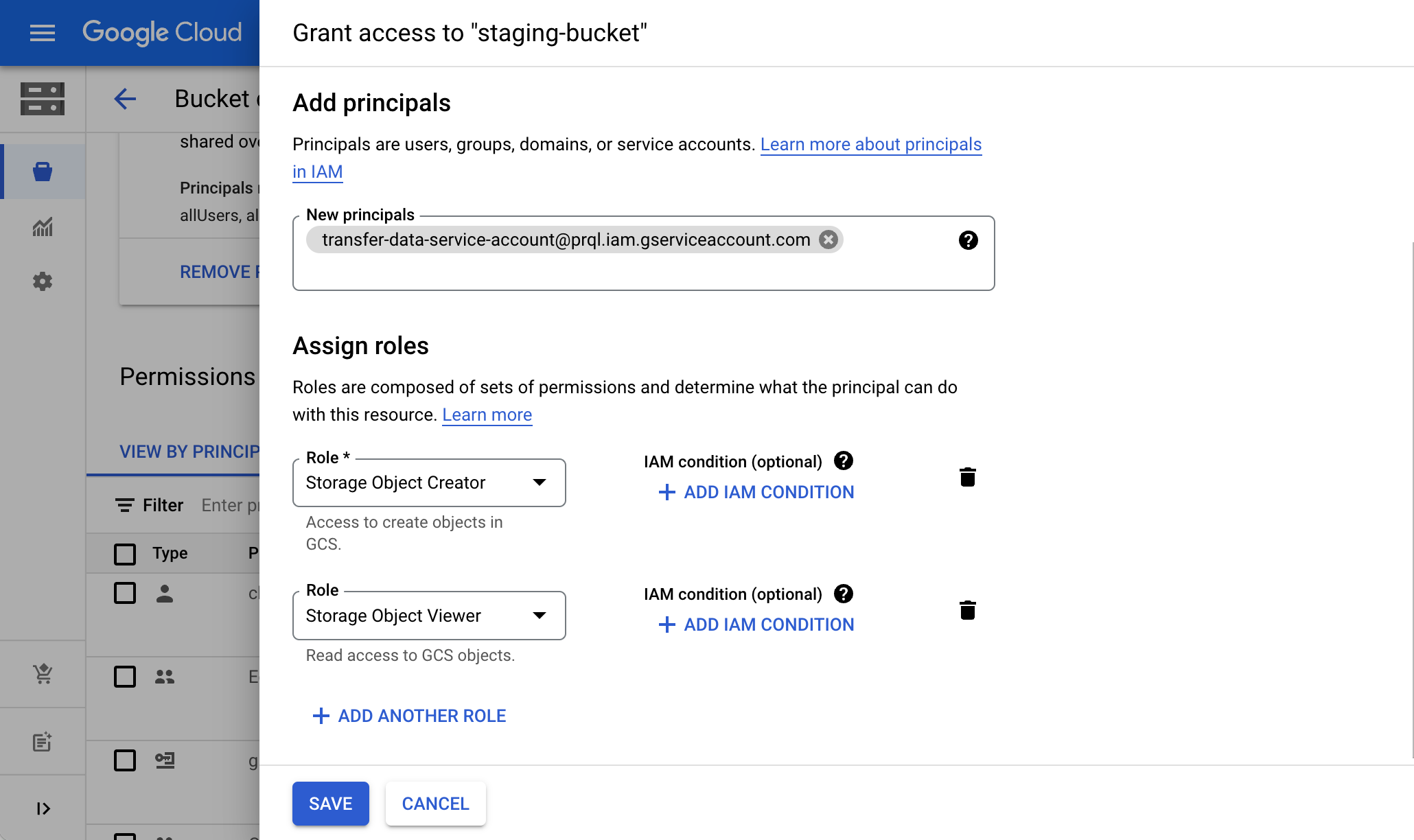
5. On the **Bucket details** page for the bucket you created, select the **Permissions** tab, and click **Grant access**.
6. Grant access to the principal (Service Account) you created in **Step 1**, and assign the Roles: **Storage Object Creator** and **Storage Object Viewer**. Click **Save**.
**Optional: Add a short retention lifecycle policy**
You may configure a lifecycle rule on the staging bucket to automatically delete objects older than 2 days as the bucket is not used to persist data. In the bucket **Lifecycle** tab, add a rule with action "Delete object" and condition "Age: 2 days". Note that transfer logic automatically cleans up files after transfer completion, so this is an optional step.
### Generate HMAC key
An HMAC key is a type of credential and can be associated with a service account or a user account to access Google Cloud Storage.
1. Navigate to the **Cloud Storage** page.
2. Click into the **Settings** tab on the left side menu.
3. In the **Interoperability** tab, click the **Create a key for a Service Account** button.
4. Select the **Service Account** created in **Step 1**, and click **Create key**.

5. Make a note of the **Access key** and **Secret**.
### You're done!
Use this configured GCS staging bucket during the connection of your preferred data source or destination.
**Note**: depending on the connection method, you may need to refer to the following field name mappings:
* **Bucket Access ID**: your HMAC Access Key.
* **Bucket Secret Key**: your HMAC Secret.